
Gateway
Tutorial to create an instance to be used as a bidirectional Gateway proxy by using Traefik and kubectl port-forward.
The Gateway allows to provide an egress traffic static public IP and/or a way to access Kubernetes private services.
The diagram below represents the Gateway role:
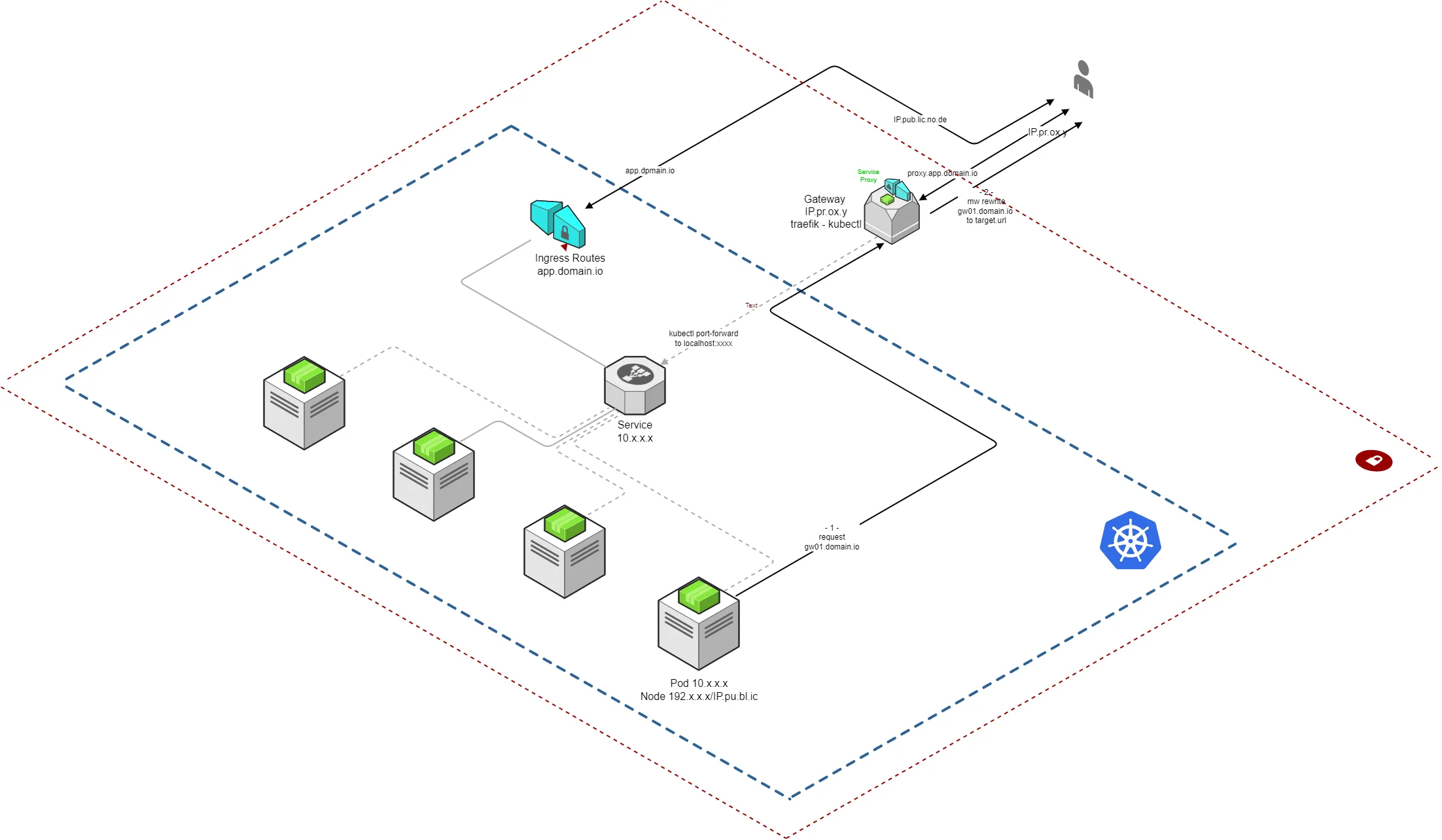
The following documentation presents how to create a Gateway instance on an Ubuntu 20.04 server. You may need to adapt it to your needs.
Instance
Section titled “Instance”- Minimum Requirement:
- 1 vCPU
- 2GB RAM
- 100Gbps Bandwidth
- 20GB Disk
- OS: Ubuntu 20.04
All the following commands have been executed as root user.
Web Proxy
Section titled “Web Proxy”We will use Traefik as reverse proxy. You can use any reverse proxy you like.
Installation
Section titled “Installation”- go to github.com/traefik/traefik/releases and download the latest binary. The documentation has been tested with the 2.6.0 version.
- extract the binary and test the installation
tar -zxvf traefik_[VERSION]_linux_[ARCH].tar.gzcp /path/to/traefik /usr/local/binchown root:root /usr/local/bin/traefikchmod 755 /usr/local/bin/traefiktraefik --help- create
traefikuser and group
groupadd -g 321 traefikuseradd \ -g traefik --no-user-group \ --home-dir /var/www --no-create-home \ --shell /usr/sbin/nologin \ --system --uid 321 traefikid traefikOutput:
uid=321(traefik) gid=321(traefik) groups=321(traefik)
Configuration
Section titled “Configuration”- create an admin user with password
apt install apache2-utilshtpasswd -nb admin [PASSWORD]Output:
admin:$apr1$ruca84Hq$mbjdMZBAG.KWn7vfN/SNK/
- traefik configuration file
mkdir /etc/traefikvi /etc/traefik/traefik.tomltraefik.toml
[global]  checkNewVersion = true  sendAnonymousUsage = true
[api]  dashboard = true
[log]  level = "INFO"  filePath = "/var/log/traefik.log"
[entryPoints]  [entryPoints.http]    address = ":80"    [entryPoints.http.http.redirections.entryPoint]      to = "https"      scheme = "https"  [entryPoints.https]    address = ":443"
[certificatesResolvers.lets-encrypt.acme]  email = "[EMAIL_TO_CHANGE]"  storage = "/etc/traefik/acme.json"  [certificatesResolvers.lets-encrypt.acme.tlsChallenge]
[providers.file] filename = "/etc/traefik/routes.toml"- routes configuration file
vi /etc/traefik/routes.tomlroutes.toml
[http.middlewares.users.basicAuth]  users = [    "admin:[PASSWORD_HASH_TO_CHANGE]"  ]
[http.routers] [http.routers.api] rule = "Host(`domain.to.change.org`)" entrypoints = ["https"] middlewares = ["users"] service = "api@internal" [http.routers.api.tls] certResolver = "lets-encrypt"- TLS certificates and logs file
touch /etc/traefik/acme.jsonchown traefik:traefik /etc/traefik/acme.jsonchmod 600 /etc/traefik/acme.jsontouch /var/log/traefik.logchown traefik:traefik /var/log/traefik.logSystem Service
Section titled “System Service”- create the Traefik service
vi /lib/systemd/system/traefik.servicetraefik.service
[Unit]Description=TraefikDocumentation=https://docs.traefik.ioAfter=network-online.targetAssertFileIsExecutable=/usr/local/bin/traefikAssertPathExists=/etc/traefik/traefik.toml
[Service]User=traefikGroup=traefikAmbientCapabilities=CAP_NET_BIND_SERVICECapabilityBoundingSet=CAP_NET_BIND_SERVICE
# configure service behaviorType=notifyExecStart=/usr/local/bin/traefik --configFile=/etc/traefik/traefik.tomlRestart=on-abnormalWatchdogSec=1s
# lock down system access# prohibit any operating system and configuration modificationProtectSystem=full# create separate, new (and empty) /tmp and /var/tmp filesystemsPrivateTmp=true# make /home directories inaccessibleProtectHome=true# turns off access to physical devices (/dev/...)PrivateDevices=false# make kernel settings (procfs and sysfs) read-only#ProtectKernelTunables=true# make cgroups /sys/fs/cgroup read-only#ProtectControlGroups=true
# allow writing of acme.jsonReadWritePaths=/etc/traefik/acme.json# depending on log and entrypoint configuration, you may need to allow writing to other paths, too
# limit number of processes in this unit#LimitNPROC=1
[Install]WantedBy=multi-user.target- enable and start the service
systemctl enable traefik.servicesystemctl daemon-reloadsystemctl start traefik.servicesystemctl status traefik.servicejournalctl --boot -u traefik.service- Access your Traefik dashboard
https://domain.to.change.org.
Port Proxy
Section titled “Port Proxy”We use kubectl to securely access to your application services.
kubectlis only required for the Ingress Services.
Check the documentation
kubectlfor more details
Installation
Section titled “Installation”curl -LO "https://dl.k8s.io/release/$(curl -L -s https://dl.k8s.io/release/stable.txt)/bin/linux/amd64/kubectl"install -o root -g root -m 0755 kubectl /usr/local/bin/kubectlkubectl version --clientConfiguration
Section titled “Configuration”Configure the ~/.kube/config to access your h8lio cluster where is located the service to expose.
mkdir ~/.kubevi ~/.kube/configCopy the content of your .kube/config file. You should use a specific user for the Gateway.
Test the access:
kubectl get serviceService
Section titled “Service”The Gateway provide ingress and egress traffic to service:
- Egress: a Kubernetes internal service calls an external service through the Gateway to provide to the client a static IP
- Ingress: a Client calls an internal Kubernetes services through the Gateway which uses
kubectl port forwardto act as local to the Gateway service.
You can repeat the following configurations for each service you want to expose to the Gateway.
Egress Service
Section titled “Egress Service”The Gateway redirects internal service calls to the external service.
If you need to redirect TCP or UDP protocols check the Traefik routers
- configure Traefik router and service
vi /etc/traefik/routes.tomlroutes.toml
[http.services]  [http.services.client-service.loadBalancer]    [[http.services.client-service.loadBalancer.servers]]      url = "https://service.client.com/"
[http.routers] [http.routers.my-service] rule = "Host(`my-service.my-gateway.com`)" entrypoints = ["https"] service = "client-service" [http.routers.my-service.tls] certResolver = "lets-encrypt"- update your Kubernetes service to call the Gateway
https://my-service.my-gateway.cominstead of the client addresshttps://service.client.com/.
Ingress Service
Section titled “Ingress Service”Create an instance failover ubuntu service to connect to your Kubernetes internal service.
To do so, we are using the kubectl port-forward command.
You may also consider to use socat as a lower level relay
- create a bash file to run the port forward command to connect to the service
vi /etc/traefik/myservice.shchmod +x /etc/traefik/myservice.shmyservice.sh
kubectl -n [namespace] port-forward service/[myserice] [local-port]:[local-port-in]Add the argument
--address 0.0.0.0to listen to the local port on any local address and forward to the resource port
- create the system service
vi /lib/systemd/system/myservice.servicemyservice.service
[Unit]Description=MyServiceAfter=network-online.targetAssertFileIsExecutable=/usr/local/bin/kubectlAssertPathExists=/etc/traefik/myservice.sh
[Service]User=rootExecStart=/bin/bash /etc/traefik/myservice.shRestart=on-failureRestartSec=5
[Install]WantedBy=multi-user.target- enable and start the service
systemctl enable myserice.servicesystemctl daemon-reloadsystemctl start myserice.servicesystemctl status myserice.servicejournalctl --boot -u myserice.service- add your router and service to Traefik configuration
vi /etc/traefik/routes.tomlroutes.toml
[http.services]  [http.services.my-service.loadBalancer]    [[http.services.my-service.loadBalancer.servers]]      url = "http://127.0.0.1:[local-port]/"
[http.routers]  [http.routers.my-service]    rule = "Host(`my-service.com`)"    entrypoints = ["https"]    service = "my-service"    [http.routers.my-service.tls]      certResolver = "lets-encrypt"
Check the Traefik routing & load balancing documentation for more routing options.
- Access to your gateway service
https://my-service.com.