
Volumes
Your cluster’s Persistent Volume Claims are listed in the Storage panel of the Cloud view, with their storage class, type, and size.
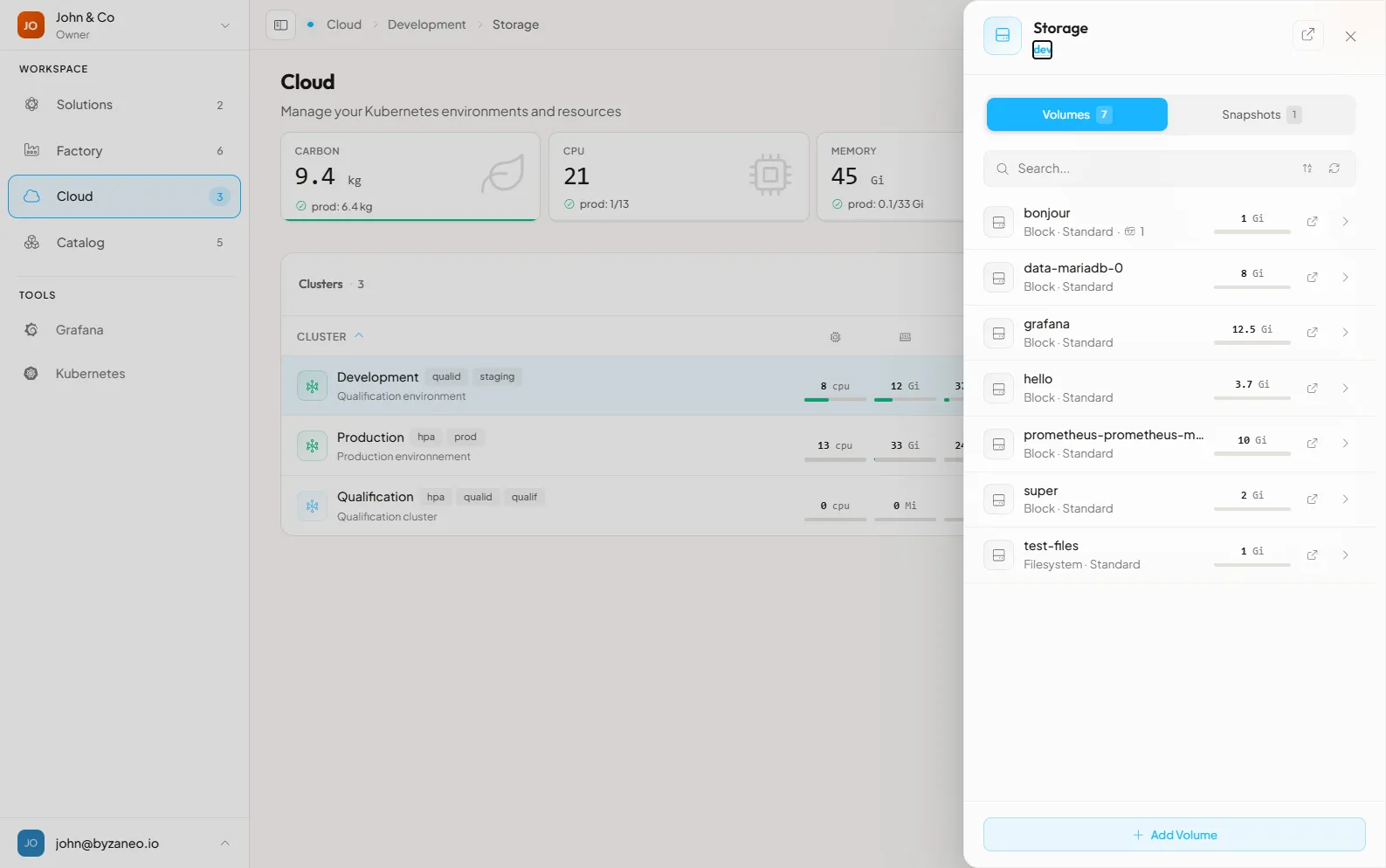
Resources
Section titled “Resources”Storage Classes
Section titled “Storage Classes”The provided storage classes are used to define the location and the kind of volume Kubernetes will create using CSI.
[location]-[kind]-[disk]-[relication](-[filesystem])- location: “eu-west-fr-gra” means Gravelines in France
- kind:
- block: standard logical volume or
- files: multiaccess shared file system
- disk:
- hdd: standard performance
- nvme: high performance
- replication: “ec” means the data Ceph pool is using Erasure Coding replication. The associated metadata pools is using replication.
- filesystem: for block volumes, you can choose between XFS or Ext4 filesystems
French storage classes:
Section titled “French storage classes:”eu-west-fr-gra-block-hdd-ec-ext4eu-west-fr-gra-block-hdd-ec-xfseu-west-fr-gra-block-nvme-ec-ext4eu-west-fr-gra-block-nvme-ec-xfseu-west-fr-gra-files-hdd-eceu-west-fr-gra-files-nvme-ec
Migrate PVC
Section titled “Migrate PVC”The following script helps to migrate or copy the source PVC to a new PVC using rsync.
If needed, this script allows to migrate the data to another the storage class
Requirements
Section titled “Requirements”Migrate script
Section titled “Migrate script”The following bash script process is:
- creates the target PVC manifest based on the source PVC configuration and the passed arguments
- applies the target PVC manifest
- scale down to 0 the given deployment or statefulset
- updates and applies the job template
- opens to edit the deployment or the statefulset to update the claim name
- scale up to 1 the deployment or the statefulset
Each above command requires a user confirmation (Enter) to process the next step. This helps to check if the previous step has been completed.
When the resource kind is a statefulset, it’s often required to recreate it with a different name to match the new PVC name.
- migrate.sh content:
#!/bin/bash# Arguments:# $1 namespace# $2 pvc source# $3 pvc target# $4 pvc target class# $5 deployment|sts name# $6 (default: deployment) deployment|sts# $7 (default: pvc source) access# $8 (default: pvc source) size## Useful:# - kubectl -n namespace get pods -o=json | jq -c '.items[] | {name: .metadata.name, namespace: .metadata.namespace, claimName: .spec |  select( has ("volumes") ).volumes[] | select( has ("persistentVolumeClaim") ).persistentVolumeClaim.claimName }'# - watch kubectl get deployment,pods,jobs,pvc -o wide -n namespace# - kubectl -n namespace delete jobs.batch --all## Example:# ./migrate.sh [namespace] [pvc-source] [pvc-target] [target-storage-class] [deployment-name] deployment ([new target size])# ./migrate.sh [namespace] [pvc-source] [pvc-target] [target-storage-class] [statefulset-name] sts
useConfirm=trueconfirm() {   [ "$useConfirm" = true ] && read -p "(enter to continue)"}
if [ -n "$6" ]; then  kind=$6else  kind="deployment"fiecho ""echo "migrate: $1:$kind/$5 $2 > $3:$4"echo ""
kc='kubectl -n '"$1"''
echo "= create pvc $3 ="pvc=$($kc get pvc $2 -o json \  | jq --arg name "$3" '.metadata.name = $name' \  | jq --arg scn "$4" '.spec.storageClassName = $scn' \  | jq '.metadata |= del(.managedFields)' \  | jq '.metadata |= del(.annotations)' \  | jq '.metadata |= del(.creationTimestamp)' \  | jq '.metadata |= del(.finalizers)' \  | jq '.metadata |= del(.resourceVersion)' \  | jq '.metadata |= del(.selfLink)' \  | jq '.metadata |= del(.uid)' \  | jq '.spec |= del(.volumeMode)' \  | jq '.spec |= del(.volumeName)' \  | jq '. |= del(.status)')if [ -n "$7" ]; then  pvc=$(echo "$pvc" \    | jq --arg access "$7" '.spec.accessModes = [$access]')fiif [ -n "$8" ]; then  pvc=$(echo "$pvc" \    | jq --arg size "$8" '.spec.resources.requests.storage = $size')fiecho "$pvc"
echo ""echo "= apply pvc $3 ="confirmecho "$pvc" | $kc apply --wait -f -
echo ""echo "= scale down $kind $5 ="confirm$kc scale $kind/$5 --replicas=0
echo ""echo "= rsync pvcs data ="job=$(cat ./migrate-job.yaml \  | sed 's/DEPLOYMENT/'"$3-$2"'/g' \  | sed 's/SOURCE_PVC/'"$2"'/g' \  | sed 's/DEST_PVC/'"$3"'/g')echo "$job"confirmecho "$job" | $kc apply --wait -f -
echo ""echo "= patch $kind ="confirm$kc edit $kind/$5
echo ""echo "= scale up $kind ="confirm$kc scale $kind/$5 --replicas=1
Migrate job
Section titled “Migrate job”The following job may be used by itself if you set the right name and set the claimNames with existing PVCs.
- migrate-job.yaml content:
apiVersion: batch/v1kind: Jobmetadata: name: rsync-DEPLOYMENTspec: parallelism: 1 completions: 1 template: spec: containers: - name: rsync # any image that provides rsync works; alpine installs it on start image: alpine command: ["sh", "-c", "apk add --no-cache rsync && rsync -avhs /pvcsrc/ /pvcdest/"] # to keep the pod running and run rsync manually instead, use: # command: ["sh", "-c", "apk add --no-cache rsync && tail -f /dev/null"] # then exec into the pod and run: rsync -avhs --exclude fake/ /pvcsrc/ /pvcdest/ volumeMounts: - name: source mountPath: /pvcsrc - name: destination mountPath: /pvcdest # adjust the resources: resources: requests: memory: "256Mi" cpu: "1" limits: memory: "16Gi" cpu: "6" volumes: # source pvc - name: source persistentVolumeClaim: claimName: SOURCE_PVC # destination pvc - name: destination persistentVolumeClaim: claimName: DEST_PVC restartPolicy: NeverWhile the job’s pod is running, you can follow the logs to check the rsync command output.
Once the job’s pod is done, its status should be “Completed”.
Resizing
Section titled “Resizing”Requirements
Section titled “Requirements”PVC resizing
Section titled “PVC resizing”Increase the PVC requested size by editing its spec.resources.requests.storage property, for example:
kubectl -n [namespace] patch pvc [name] --type merge -p '{"spec":{"resources":{"requests":{"storage":"[new-size]"}}}}'The StorageClass must allow volume expansion (
allowVolumeExpansion: true); the h8lio Ceph storage classes do. A PVC can only grow, never shrink.
Check the namespace’s events to follow the CSI resize process.
StatefulSet resizing
Section titled “StatefulSet resizing”Once you resized the PVC, you may want to update the associated StatefulSet (STS) which manage the volume. But you will get the error below:
* spec: Forbidden: updates to statefulset spec for fields other than 'replicas', 'template', and 'updateStrategy' are forbiddenthe following process is done with zero downtime
- Get the STS manifest:
kubectl -n [namespace] get sts [name] -o yaml > sts.yaml-
Edit the sts.yaml file to set the property
spec.storage.VolumeClaimTemplate.spec.resources.requests.storagewith the new PVC size -
Delete the StatefulSet without deleting the pods:
kubectl -n [namespace] delete sts [name] --cascade=orphan- Remove clutter from the sts.yaml manifest (you can use kubectl-neat to do it) then apply it
kubectl -n [namespace] apply -f sts.yamlIf the STS is managed by Helm, remember to update your chart values with the new size